Free Eisenhower Matrix Online for Team Prioritization
The ultimate time management matrix to organize tasks by urgency and importance. Collaborative voting, scatter chart, RACI matrix and multiple visualization modes. Also known as the Eisenhower Box, priority matrix or urgent important matrix. Sign in with Google and start in seconds.
Get Started Free →See the Eisenhower Matrix in Action
How It Works
Add Your Tasks
Enter the activities to evaluate and invite your team to collaborate on prioritization. Each task can have a description, notes, and tags.

Vote and Classify
The team votes independently on urgency and importance. The system automatically assigns each task to the correct quadrant with transparent scoring.

Act on Priorities
Focus on "Do First" tasks, schedule the important ones, delegate urgent tasks, and eliminate distractions. Export to other Keisen tools.

Why Teams Choose Keisen as Their Prioritization Matrix Tool
4-Quadrant System
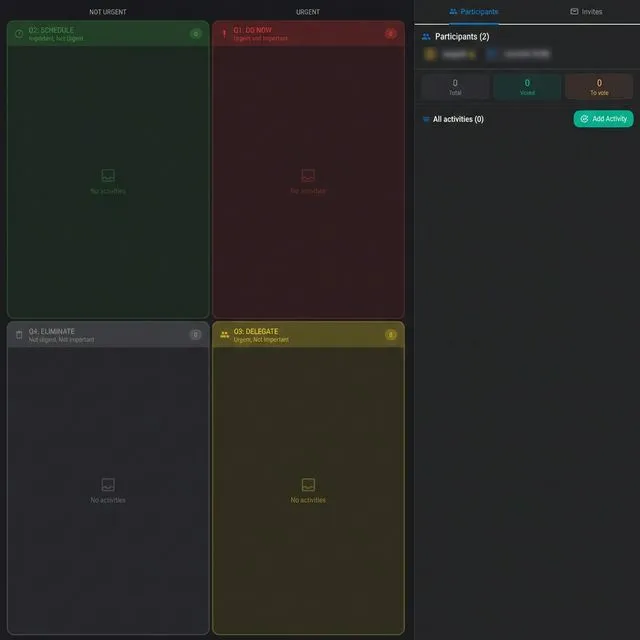
Drag and drop tasks into Do First, Schedule, Delegate, and Eliminate with intuitive interaction.
Team Voting
Independent voting on urgency and importance with reveal system for unbiased decisions.
Multiple Views
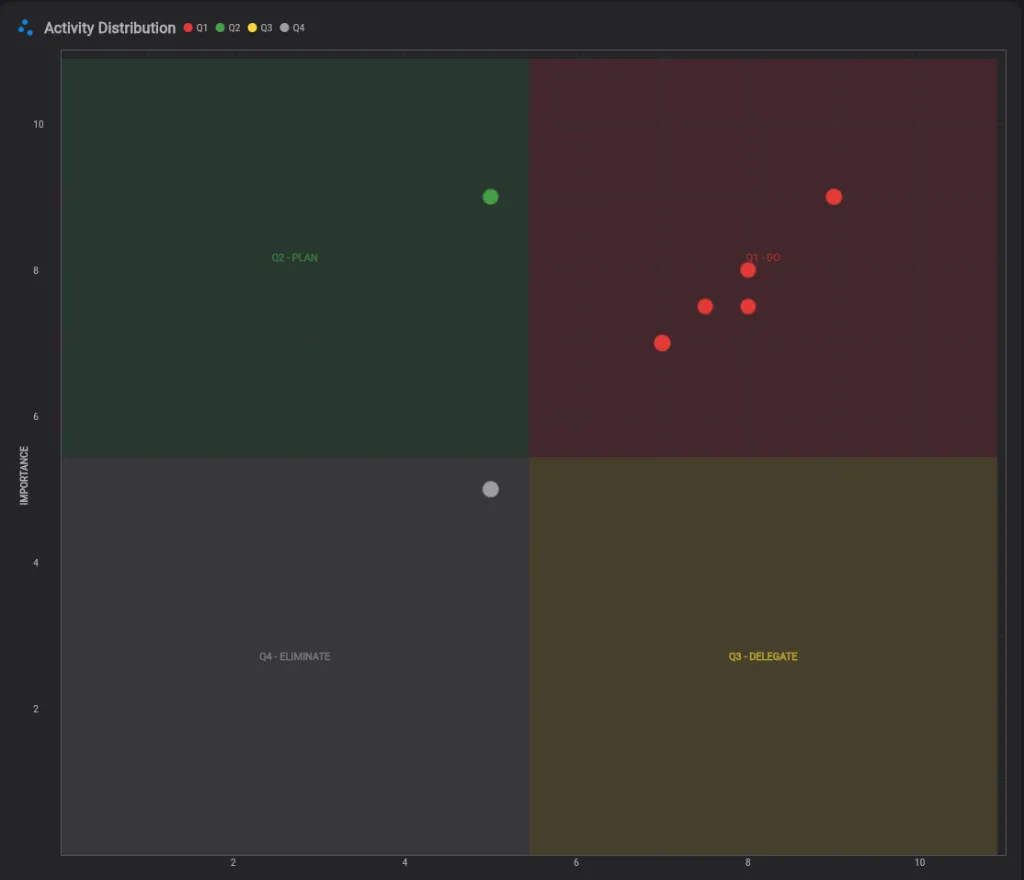
Switch between grid view, scatter chart, and priority list for different analysis perspectives.
RACI Matrix
Assign roles: Responsible, Accountable, Consulted, and Informed for each prioritized task.
Import & Export
Seamlessly move your data. Import tasks from CSV to get started instantly, or export your prioritized matrix to PDF and CSV for professional reporting and team sharing.
What is the Eisenhower Matrix?
The Eisenhower Matrix (also known as the Urgent-Important Matrix, Priority Matrix, or Eisenhower Box) is a powerful time management framework that helps individuals and teams prioritize tasks based on their urgency and importance. By dividing work into a 2x2 grid, it forces you to distinguish between tasks that require immediate reaction and those that contribute to long-term strategic goals.
The Difference Between Urgent and Important
The core philosophy of this productivity matrix relies on understanding a fundamental difference:
- Urgent tasks demand your immediate attention. They are reactive, tied to a deadline, and often involve someone else's goals (e.g., a ringing phone, a server crash, an angry client).
- Important tasks contribute to your long-term mission, values, and strategic goals. They are proactive and require deep focus (e.g., strategic planning, team building, continuous improvement).
As Dwight D. Eisenhower famously noted, "What is important is seldom urgent and what is urgent is seldom important." Keisen brings this philosophy directly into your team's workflow.
Deep Dive into the 4 Eisenhower Quadrants
Understanding how to categorize your work is the first step to mastering the matrix. Here is how high-performing teams use the four quadrants effectively.
Quadrant 1: Do First (The Crisis Sector)
Urgent & Important. These are critical tasks that require immediate action. If you ignore them, there will be direct, negative consequences.
The Golden Rule: Limit this quadrant to 3-5 tasks per day to avoid burnout. If everything is a crisis, it usually points to a lack of planning in Quadrant 2.
Examples: Production server crashes, critical client deadlines, PR crises.
Quadrant 2: Schedule (The Strategic Sector)
Important but Not Urgent. This is where true success lives. Highly effective leaders and agile teams spend 80% of their time here, focusing on proactive growth.
The Golden Rule: Protect this time fiercely. Since these tasks have no immediate deadline, they are usually the first to be neglected.
Examples: Strategic planning, skill development, process documentation, team building.
Quadrant 3: Delegate (The Illusion of Urgency)
Urgent but Not Important. Tasks that demand immediate attention but do not contribute to your core goals. Often, these are interruptions from others.
The Golden Rule: Find someone else who is better suited. Use Keisen's integrated RACI matrix to explicitly define who is Responsible vs who is just Informed.
Examples: Routine approvals, certain email chains, minor bug fixes, scheduling meetings.
Quadrant 4: Eliminate (The Trap)
Not Urgent & Not Important. Activities that consume time without generating any real value. These are distractions disguised as work.
The Golden Rule: Be ruthless. Delete these tasks from your workflow. Review this quadrant during your team Retrospective to identify recurring time-wasters.
Examples: Pointless status meetings, excessive social media scrolling, micromanagement.
Powerful Task Prioritization Tools
- Ready-to-use Eisenhower Matrix template with 4-quadrant prioritization and intuitive drag and drop reordering
- Anonymous voting — team members vote independently on urgency and importance (1–10 scale). Votes remain hidden until the facilitator triggers a collective reveal, preventing anchoring bias and ensuring each person's genuine assessment
- Facilitator-led sessions — the matrix owner acts as facilitator, guiding the prioritization flow: starting vote rounds, revealing results, and managing participants. Observers can follow along without influencing scores
- Invitation system — share your matrix via invite link or email. Define roles (Facilitator, Voter, Observer) for each participant to control who can vote and who watches
- Three visualization modes: grid view for classic quadrant layout, scatter chart for urgency-vs-importance plotting, and priority list for ranked action items
- Integrated RACI matrix — assign Responsible, Accountable, Consulted, and Informed roles directly on each task. Know exactly who does what after prioritization
- Real-time collaboration with presence tracking — see who's online, who has voted, and who is still deciding
- Automatic scoring based on team votes with weighted averages and alignment statistics to measure consensus
- CSV import and export with dedicated templates — bulk-load tasks from spreadsheets or export prioritized results for reporting
- Professional Reporting — Export your prioritization results into multi-page PDF reports. Includes the 4-quadrant grid, scatter plots with consensus data, and the RACI matrix for team alignment and board presentations. Fully compatible with mobile devices and tablets, it allows you to share and print professional reports wherever you are.
- Bidirectional sync with Smart Todo — export tasks for voting, then priorities sync back automatically (Q1→High, Q2→Medium, Q3/Q4→Low). Also export to Agile Process for sprint planning
- Task completion and archival — mark tasks as done, archive past sessions, and keep a history of prioritization decisions
- Tags, descriptions, and notes on every task for context-rich prioritization
- Sign in with Google and start your first matrix in seconds — works in any browser, no software to install
- A modern alternative to spreadsheet templates, Notion Eisenhower matrices, and static productivity matrix tools
Complete your agile workflow with Estimation Room for collaborative estimation and Retrospective for continuous team improvement.
The Origin: From Dwight Eisenhower to Stephen Covey
The Eisenhower Matrix was inspired by Dwight D. Eisenhower, the 34th President of the United States and Supreme Commander of Allied Forces in WWII. He famously said: "What is important is seldom urgent and what is urgent is seldom important."
Stephen Covey later popularized this concept in his bestseller The 7 Habits of Highly Effective People, presenting it as the Time Management Matrix — a tool for moving from reactive firefighting (Quadrant 1) to proactive planning (Quadrant 2). Covey's insight was that Quadrant 2 — important but not urgent — is where the highest-impact work happens: strategic planning, relationship building, and personal growth.
Keisen brings this proven framework into the digital age with real-time team collaboration, turning a personal productivity method into a powerful team prioritization tool.
Beyond Templates: Excel, PDF vs. Keisen
Many teams start prioritizing by downloading a free Eisenhower Matrix Excel template or a printable PDF. While a static table works for personal to-do lists, it completely fails when prioritizing as a team.
Here is why an interactive prioritization app outperforms static Notion or Excel templates:
- No Anchor Bias: In a spreadsheet, the first person to assign a priority influences everyone else. Keisen uses hidden, independent voting to ensure genuine team consensus.
- Automatic Calculations: Instead of manually guessing where a task belongs, Keisen calculates weighted averages from your team's votes and places tasks in the right quadrant.
- Workflow Integration: A PDF goes in the trash. Keisen exports your prioritized tasks directly to Smart Todo or an Agile Sprint, syncing priority levels automatically.
Tip: If you absolutely need a spreadsheet for offline reporting, Keisen allows you to Export to CSV with one click, giving you the best of both worlds.
5 Common Prioritization Mistakes (And How to Fix Them)
Simply dragging tasks into a grid won't miraculously fix your time management. Avoid these common pitfalls that teams face when using the Eisenhower method:
1. The "Everything is Priority 1" Trap
When everything is urgent, nothing is. If the "Do First" quadrant has 20 tasks, your team will suffer from decision fatigue. Fix: Use Keisen's voting system. When multiple people vote on importance, the true 3-5 critical tasks naturally float to the top.
2. The HiPPO Effect (Highest Paid Person's Opinion)
In open meetings, the manager's priority becomes the team's priority. This kills innovation and hides critical technical debt. Fix: Require anonymous voting on urgency and importance before revealing the scores.
3. Neglecting Quadrant 2
Because strategic planning (Q2) doesn't have a ringing alarm, it gets pushed to next week indefinitely. Fix: Actively export Q2 tasks to your Agile Sprint using Keisen's sync feature to guarantee they get resources allocated.
4. Delegating Without Clear Ownership
Placing an item in the Delegate quadrant often means it falls into the void. Fix: Use the built-in RACI matrix in Keisen. Assign exactly who is Responsible for execution before concluding the session.
5. Confusing Productivity with Efficiency
Being efficient means doing things fast. Being productive means doing the right things. The Eisenhower Matrix is designed to stop you from efficiently completing useless Quadrant 4 tasks.
Frequently Asked Questions
What is the Eisenhower Matrix?
The Eisenhower Matrix is a prioritization framework that organizes tasks into 4 quadrants based on urgency and importance: Do First (urgent and important), Schedule (important but not urgent), Delegate (urgent but not important), and Eliminate (neither urgent nor important). In Keisen you can use it collaboratively with your team.
How does the 4-quadrant system work in Keisen?
Add tasks to evaluate and your team votes independently on urgency and importance for each one. The system automatically calculates placement in the correct quadrant based on average scores. You can also manually drag and drop tasks between quadrants.
What is the RACI matrix integration?
The RACI matrix is integrated directly into the Eisenhower Matrix. For each task you can assign who is Responsible (does the work), Accountable (has decision authority), Consulted (provides input), and Informed (receives updates). This clarifies responsibilities for every prioritized task.
How does team voting work?
Each team member votes independently on urgency and importance for every task, scoring from 1 to 5. Votes are hidden until collective reveal to avoid bias. The system calculates vote averages and shows team alignment statistics.
Can I use the Eisenhower Matrix with a remote team?
Yes, Keisen is designed for both remote and in-person teams. It is a web tool that works in any browser. Team members can participate via invite, vote independently, and collaborate on prioritization in real time from any location.
How is Keisen different from other prioritization tools?
Keisen combines the Eisenhower Matrix with unique features: team voting with reveal, interactive scatter chart, integrated RACI matrix, automatic scoring, and cross-tool export to Smart Todo, Estimation Room, and Agile Sprint. It is not just a static matrix but a complete collaborative prioritization system.
Can I export prioritized tasks?
Yes, you can export to CSV for external analysis or directly transfer prioritized tasks to Smart Todo for task management, Estimation Room for collaborative estimation, or Agile Process for sprint integration. Cross-tool export preserves all priority information.
How do I get started with Keisen?
Getting started is quick and easy: sign in with your Google account and you are ready to go. No lengthy registration forms. Open Keisen, create a new matrix, add tasks, and invite your team. The entire process takes less than a minute.
Does the Eisenhower Matrix work on mobile devices?
Yes, Keisen is fully responsive and works on smartphones, tablets, and desktop browsers. You can prioritize tasks, vote on urgency and importance, and view the scatter chart from any device — no app download needed. The interface adapts to your screen size for the best experience.
Is the Eisenhower Matrix the same as the Time Management Matrix?
Yes, the Eisenhower Matrix is often called the Time Management Matrix, the Urgent Important Matrix, or the Eisenhower Box. Stephen Covey popularized a version of it in his book The 7 Habits of Highly Effective People as the 4 Quadrants of Time Management. All these names refer to the same framework that divides tasks by urgency and importance. Keisen implements the complete method with collaborative features.
What is the difference between urgent vs important tasks?
Urgent tasks demand immediate attention but may not move you toward long-term goals. Important tasks contribute to your mission and values. The Eisenhower Method teaches that most people spend too much time on urgent but unimportant tasks (Quadrant 3) instead of important but not urgent ones (Quadrant 2). Keisen helps teams distinguish between the two through structured voting on urgency and importance for each task.
Can I use Keisen as an Eisenhower Matrix template?
Keisen goes beyond a static Eisenhower Matrix template. Instead of a simple PDF, Excel, or Notion template, you get a live, interactive prioritization matrix with team voting, automatic scoring, scatter chart visualization, and RACI role assignments. It is the ideal task prioritization tool for teams that need a dynamic, reusable productivity matrix rather than a one-time document.
What are practical Eisenhower Matrix examples?
Common Eisenhower Matrix examples include: Do First — a production bug affecting customers, a contract deadline tomorrow. Schedule — strategic planning, team skill development, process improvements. Delegate — routine status reports, scheduling meetings, standard approvals. Eliminate — excessive email checking, unnecessary meetings, low-value reports. Keisen provides this action priority matrix structure with real-time collaboration for your entire team.
Ready to prioritize smarter?
Start using the Eisenhower Matrix to focus on what truly matters.
Get Started Free →